
plotting - How does one set a logarithmic scale in a ContourPlot?


How does one set a logarithmic scale for both x and y axes in ContourPlot in Mathematica?


Answer


One possibility is to plot the contour plot with linear scales using ContourPlot and use ListLogLogPlot to transform this plot to one with logarithmic scales:


pl = Normal@
ContourPlot[
Sin[3 x] + Cos[3 y] == 1/2, {x, .01 Pi, 3 Pi}, {y, .01 Pi, 3 Pi},
PlotPoints -> 30]
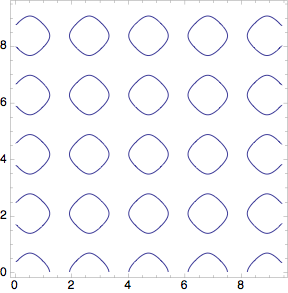
Mathematica graphics


ListLogLogPlot[Cases[pl, Line[a_, b___] :> a, Infinity], 
Joined -> True, Frame -> True, PlotRange -> All, AspectRatio -> 1,

PlotStyle -> ColorData[1][1]]

Mathematica graphics


Comments

Popular posts from this blog

plotting - How to draw lines between specified dots on ListPlot?

I would like to create a plot where I have unconnected dots and some connected. So far, I have figured out how to draw the dots. My code is the following: ListPlot[{{1, 1}, {2, 2}, {3, 3}, {4, 4}, {1, 4}, {2, 5}, {3, 6}, {4, 7}, {1, 7}, {2, 8}, {3, 9}, {4, 10}, {1, 10}, {2, 11}, {3, 12}, {4,13}, {2.5, 7}}, Ticks -> {{1, 2, 3, 4}, None}, AxesStyle -> Thin, TicksStyle -> Directive[Black, Bold, 12], Mesh -> Full] I have thought using ListLinePlot command, but I don't know how to specify to the command to draw only selected lines between the dots. Do have any suggestions/hints on how to do that? Thank you. Answer One possibility would be to use Epilog with Line : ListPlot[ {{1, 1}, {2, 2}, {3, 3}, {4, 4}, {1, 4}, {2, 5}, {3, 6}, {4, 7}, {1, 7}, {2, 8}, {3, 9}, {4, 10}, {1, 10}, {2, 11}, {3, 12}, {4, 13}, {2.5, 7}}, Ticks -> {{1, 2, 3, 4}, None}, AxesStyle -> Thin, TicksStyle -> Directive[Black, Bold, 12], Mesh -> Full, Epilog -> { Line[ ...

calculus and analysis - Integral of the Sinc product

Let us consider the following integral $$ B_n = \int_0^\infty \prod_{k=1,3,5,\dots}^n\frac{\sin (x/k)}{x/k}dx $$ By definition, Sinc[x] == Sin[x]/x , therefore B[n_?OddQ] := Integrate[Product[Sinc[x/k], {k, 1, n, 2}], {x, 0, Infinity}] B /@ Range[1, 13, 2] {Pi/2, Pi/2, Pi/2, Pi/2, Pi/2, Pi/2, Pi/2} OK, everything is fine. But... B[15] 467807924713440738696537864469 Pi/935615849440640907310521750000 What's going on? Answer As Eckhard wrote in comments B[n] is the n-th Borwein integral . (The letter B was not accidental :) ) This funny properties of Borwein integrals is related to the Fourier transform of Sinc function FourierTransform[Sinc[x], x, k] 1/2 Sqrt[Pi/2] (Sign[1 - k] + Sign[1 + k]) Plot[%, {k, -2, 2}, Filling -> 0] which is the box function. The result is $\pi/2$ while the sum $$ 1/3+1/5+\dots+1/n $$ B_n = \frac{\pi}{2} - \pi \bigg(\sum_{k=3,5,\ldots}^n\frac{1}{k} -1\biggr)^\frac{n-1}{2}\prod_{k=3,5,\dots}^n\frac{k}{k-1}. $$ For $n=15$ it is equal to $$ \frac{46780...

list manipulation - Selecting multiple columns from a matrix?

Sample data: data = { {{2013, 1, 1}, 24.13, 167.67, 231.82}, {{2013, 1, 2}, 32.15, 170.92, 225.99}, {{2013, 1, 3}, 35.43, 172.68, 221.67}, {{2013, 1, 4}, 36.73, 173.05, 218.32}, {{2013, 1, 5}, 58.19, 165.96, 197.05}, {{2013, 1, 6}, 69.99, 163.50, 187.52}, {{2013, 1, 7}, 71.37, 154.21, 175.58}, {{2013, 1, 8}, 72.51, 149.66, 163.25}}; I want a DateListPlot with three graphs, so for a matrix formed by columns 1 and 2, one for columns 1 and 3, and 1 for columns 1 and 4. At the moment I'm using this code: data2 = Transpose[{data[[All, 1]], data[[All, 2]]}]; data3 = Transpose[{data[[All, 1]], data[[All, 3]]}]; data4 = Transpose[{data[[All, 1]], data[[All, 4]]}]; DateListPlot[{data2, data3, data4}, Joined -> True, Filling -> {3 -> {1}}] but I have a hunch that this can be done more efficiently. I don't like the Transpose s in particular. Any ideas? edit (for extra credit) What if I need to multiply the second column by 2, which in my solution is simp...